⚠️ Disclaimer: You are viewing an Archived Portfolio.
You’re viewing work from my early career [2015] - [2021]. To see my most recent work check out my latest work here →
UX Design
AWeber is a "Powerfully-Simple" email marketing platform for small businesses. I work as a UX Designer to create new features and improve the overall user experience.
This page presents some key projects I worked on followed by an overview of the process I typically follow.
*Note specific data in screenshots were sanitized for privacy purposes.


*Illustration by Rob Heath
Projects
Smart Designer
It can be hard for users to get started with email marketing and it can take a long time to design a good looking email that matches your brand.
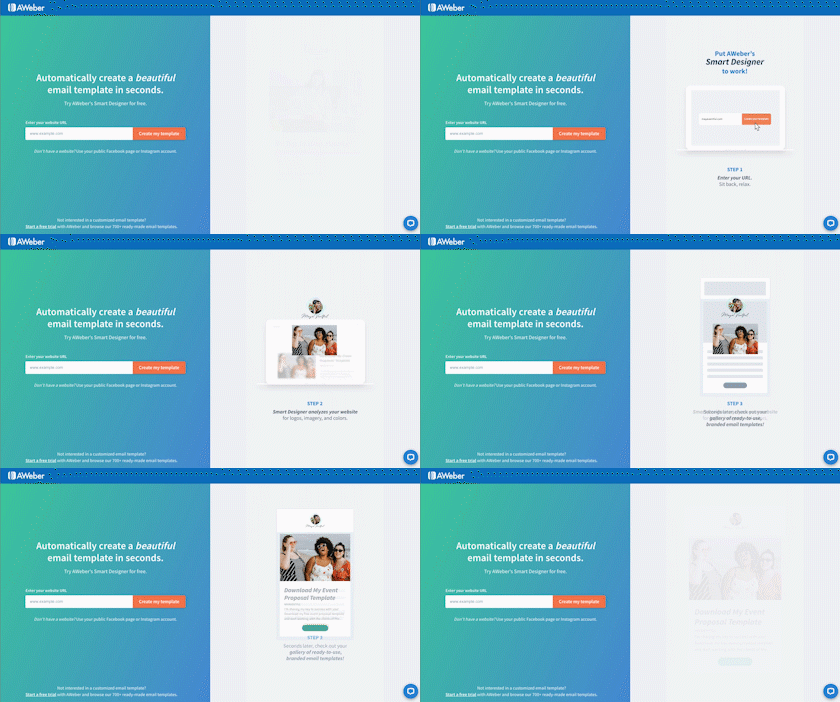
"Smart Designer" automatically scrapes items from a user's website and inserts items like a logo, images, and color palette into an email template.
In this project, I created user flows, wireframes, and conducted user tests. These findings led to several changes shown below:
Pain Point
Design change
What should users expect. Lack of website?
Add animated gif and copy to landing page

Pain Point
Design change
Users unsure how to edit
Outline on hover as signifier

Pain Point
Design change
Users expected to click on preview to edit
Allow clicking on template sections to edit

Pain Point
Design change
Expected bottom right CTA
Add Save CTA to bottom right

Usability Metrics
I tracked design progress and supported business decisions using several tools:
-
Net Promoter Score (NPS)
-
System Usability Scale (SUS)
-
Monthly Cancellation Survey Analysis
-
KISSMetrics
I also created self-service data dashboards using Google Data Studio to help find insights in our data.
Internal users can view high level visualizations and update them using date ranges and filters.

Other Work
I've worked on a variety of other projects including:
Onboarding
We looked at strategies for personalizing an onboarding process and defining steps needed for success.
Split Tests
Iterative designs are constantly split tested to see how people interact with different elements.
Information Architecture
We use card sorting and treejack studies to understand how users think of navigation.
Order Form UX Analysis
Research and best practices were used to improve the layout and flow of our order form.
Process
Agile Methodology
Projects are managed using Agile development. Most of my projects are done using the Scrum framework though Kanban is used in some instances. Key points include:
Sprints: Work is split into 2 week sprint periods.
Agile ceremonies:
-
Sprint Planning
-
Sprint Grooming
-
Daily Stand-Up Meetings (SUM)
-
Retrospective
-
Demo Day
Periodic Scrum Master Duties: UX Designer support


Observe & Research
The first stage is about collecting feedback, learning from users, and analyzing patterns to inform our future direction. Depending on the project, I may perform these tasks:

Competitive Analysis: Similar apps are reviewed to identify ways they address the problems we are trying to answer.
Targeted Survey: Ask users about their views on an assumption we have. Survey designed to avoid cognitive biases.
Customer Solutions JIRA Ticket Analysis: Patterns are identified in tickets made by our customer solutions team.
Cancellations, NPS, SUS Survey Analysis: Themes are pulled out from our ongoing feedback surveys.
Internal Interviews: Meetings with team members discussing the problem are scheduled and documented
Fullstory Analysis: Recorded user sessions are viewed to find points of friction.



Ideate
Using what I found in my research, I work with the team to formulate ideas and solutions. This stage may involve:
Brainstorming: A broad cross-team meeting may be planned and facilitated to sketch out and whiteboard ideas.
Workshop: A design workshop can be planned out and facilitated when there are larger questions we want to address.
Business Requirements Documentation: A meeting with the product manager is planned to understand the project's goals.


Flows & Wireframes
At this point in a project, I focus on testing ideas to validate our assumptions with real users. Steps include:
Defining MVP and Future Versions: The product manager and UX designer specify the required functionality in each version.
Flow Diagram: The user's flow through the feature is mapped out and reviewed by the team.
Wireframes: Wireframes are sketched out using a design tool like Adobe XD or Axure RP.
UX Notes and Content: Interactions and validation conditions are recorded as well as a draft of the copy to be approved.
Design Review: Wireframes are critiqued by the entire design team and product team.
High Fidelity Design Collaboration: Work is done with the UI designer to create a visual design adhering to the style guide.


Framer


User Testing
After a high fidelity design completed, I can begin the process of user testing with these tasks:
Planning: A facilitation guide is created for each user test to document the approach, goals, and key user tasks.
Recruiting: A slide-in modal is shown in our app using a tool like Appcues. Sessions are scheduled and confirmed.
Conduct and Analyze: The user testing sessions are recorded and results are analyzed. Key takeaways are then presented.


Beta Test
After revisions are made based off the user tests and work is started on the feature, we prepare for beta tests.
Feedback Element: A plan is made to add an element beta users can interact with to provide feedback to the team.
Beta Test Recruiting A pool of target users is created and contacted. We may use a hidden feature flag for testing.
Feedback Analysis: Key themes are collected from beta testers and action items are then created to refine the product.


Conclusions
In the real world, there's never enough time and we need to build rapidly. But, I've learned that talking to users is always worth it. Listening is at the heart of every good product and I take a "Both/And" approach combining expert knowledge with design driven by people.